PDF too large to upload: six fixes in the right order
Job portals, visa sites, school systems and government forms often cap uploads at 1, 2 or 5 MB. Your scanned file may be ten times that. The page just says "file too large" and gives no hint what to do.
The fixes below are in a deliberate order: start with the one that costs you the least quality and move down the list only if you have to.
First, find out why it is big
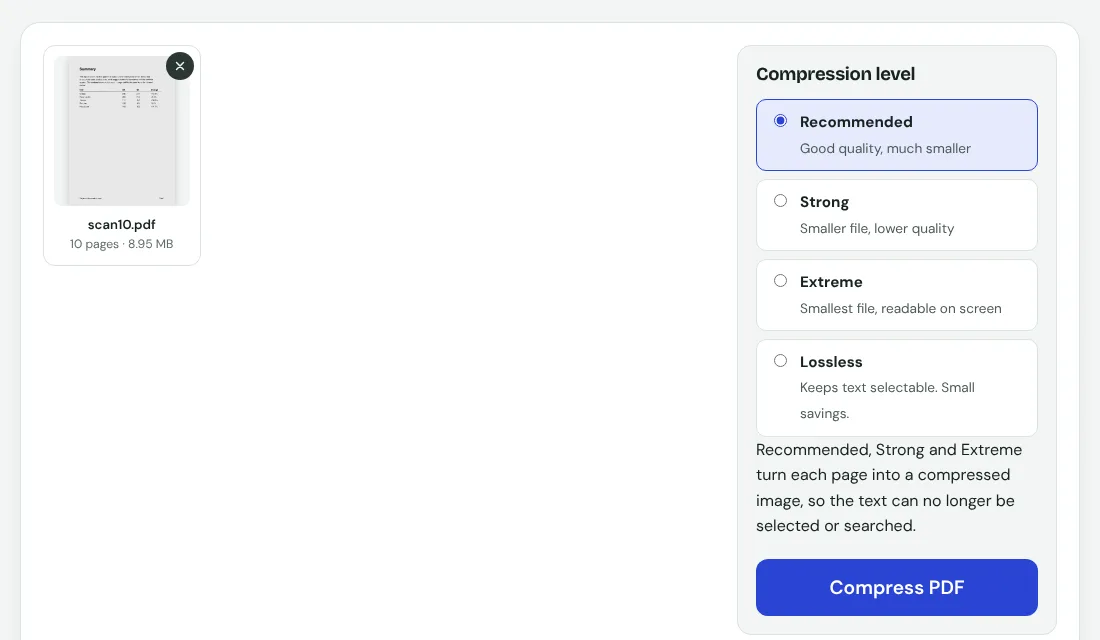
Open the file properties or look at the size next to the file name. Then ask one question: is this a scan or a typed document? A typed eight-page report in a test was 8.6 KB. A ten-page scan was 8.95 MB, about a thousand times bigger. Text is almost free, pictures are not. If your PDF is a scan, almost every fix below will help a lot. If it is typed and still large, it probably contains big embedded photos.
Fix 1: delete pages you do not need
The cheapest way to cut size is to send fewer pages. Blank backs of pages, cover sheets and duplicate copies all count. Use Remove pages and tick the ones to drop. If the portal wants only certain pages, extract just those instead.
Fix 2: compress at the Recommended level
Open Compress PDF and choose Recommended. On the 10-page scan it brought 8.95 MB down to 907 KB, about 90 percent smaller, and the page was still easy to read. That is usually enough to pass a 1 MB or 2 MB limit.
One thing to know: this level redraws each page as an image, so the text can no longer be selected. Most upload forms do not care. If yours needs searchable text, see fix 6.
Fix 3: go stronger if it is still too big
- Strong made the same scan 228 KB. Small print gets softer.
- Extreme made it 101 KB. Fine to read on screen, poor for printing.
- Use Extreme only when the limit is very tight, and zoom in to check that names, numbers and signatures are still readable.
Fix 4: split the document
Some portals take several files. If the form allows it, split the PDF into two or three parts and upload them one after another. Do this before you compress further, because it does not cost any quality.
Fix 5: rescan or re-photograph at a lower resolution
If you control the scan, set it to 150 to 200 DPI instead of 600. Phone photos are the same story: a modern phone photo is several MB. Turn a stack of photos into one PDF with JPG to PDF, and know that this step does not shrink them. In a test, three PNG receipts of 11.1 MB in total became a 12.5 MB PDF, so compress afterwards.
Fix 6: keep the text searchable
If the portal reads the PDF to pull out your details, you may need selectable text. Compress first, then run OCR. The text layer adds little size, and it is the order that keeps both the small file and the searchable text.
Before you upload
- Open the final file once and scroll through every page.
- Check the file size again, since some portals count in MB with different rounding.
- Keep the original in a safe place. Compression is not reversible.