How to reduce a PDF to 200 KB, 100 KB or less
Online application forms in Pakistan and elsewhere, such as job portals, university admissions and recruitment tests, often ask for documents under a fixed size. The limit is usually printed next to the upload button, and it can be as small as 100 or 200 KB. A PDF made from phone photos is often several MB, so it gets rejected straight away.
Below is the order that works, with the sizes we got in a real test using three photographed documents.
Our test file
We photographed three sample A4 documents (a certificate, a transcript and a letter) with the kind of quality a phone camera gives, about 3 MB per photo. Turned into one PDF with JPG to PDF, the file came to 8.34 MB. That is more than 40 times a 200 KB limit.
Step 1: pick a compression level
Open Compress PDF, add your file and choose a level. These are the sizes our 8.34 MB file came down to:
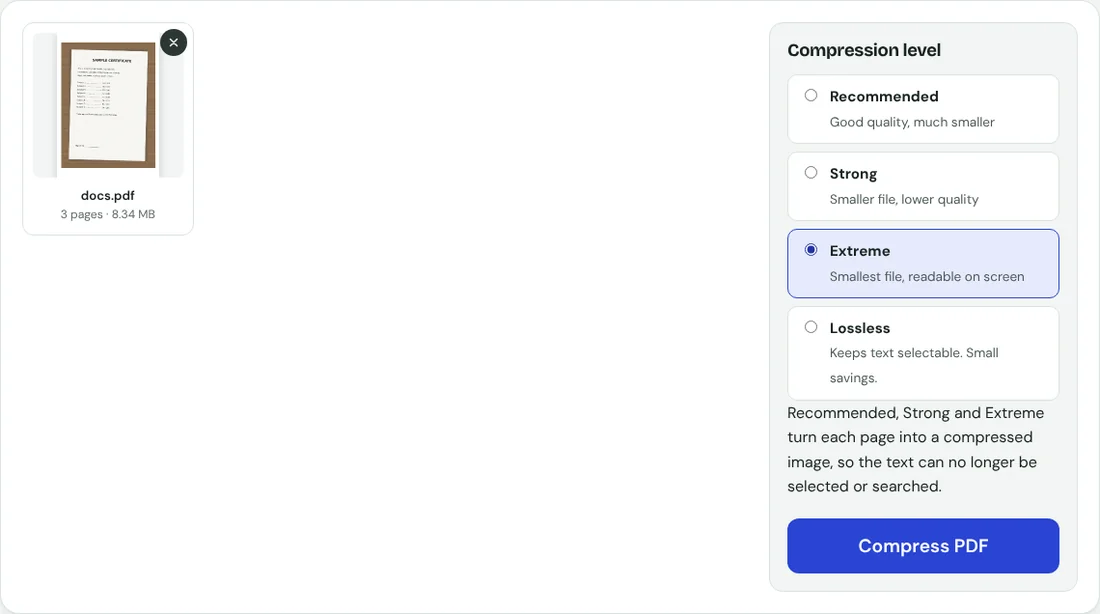
- Recommended: 166 KB. Under a 200 KB limit already, and the text was still sharp.
- Strong: 79 KB. Fits a 100 KB limit. Small print gets a little softer.
- Extreme: 46 KB. Fits a 50 KB limit. Fine on screen, but zoom in to check every number.
Step 2: check the result before you upload

Download the file and open it. Zoom in on your name, roll number, CNIC number and any marks or dates. If something is hard to read, go back one level. A form officer who cannot read your document may reject it, which is worse than spending another minute here.
If it is still too big
- Remove pages the form does not ask for, such as blank backs or a cover sheet, with Remove pages.
- If the form has separate upload boxes for each document, split the PDF and upload each part on its own. Each part is then much smaller.
- Crop your photos to the edges of the paper before making the PDF. Background table or floor is wasted space that still costs bytes.
Why the size drops so much
A phone photo stores millions of tiny colour details, most of which a form reader never needs. The three stronger levels redraw each page as a lighter image, which removes most of that detail while keeping the writing readable. The catch is that the text can no longer be selected or searched. For an upload form that is almost never a problem. If the portal needs selectable text, use OCR PDF on the compressed file afterwards.
Your documents stay on your phone
Certificates and ID cards contain personal details. Compression on this site runs inside your browser, so the file is not uploaded to our server.