How to put your CNIC front and back in one PDF
Many applications ask for a copy of your CNIC as a single PDF with both sides. You do not need a scanner or an app. Two photos from your phone and a couple of minutes are enough.
The pictures in this guide use a made-up sample card, not a real one.
Step 1: take two good photos
- Put the card on a plain, dark surface. A light card on a dark table is easier to read.
- Hold the phone straight above the card, not at an angle, and avoid the shadow of your hand.
- Turn off the flash. It causes a white glare on the plastic that can hide your number.
- Crop each photo close to the card in your phone’s gallery. This makes the card bigger on the page and the file smaller.
Step 2: turn the photos into a PDF
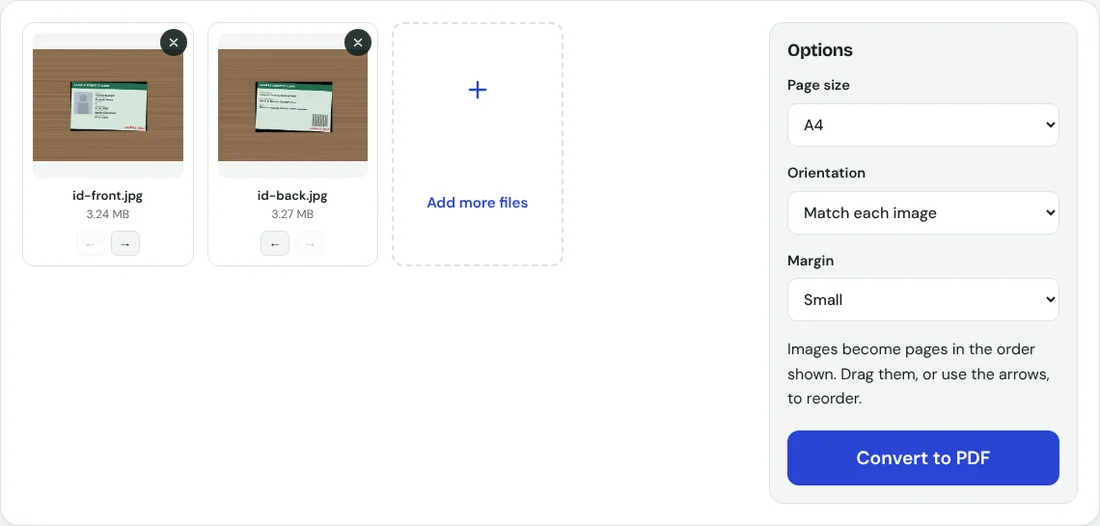
- Open JPG to PDF and add both photos.
- Check that the front comes first. Use the arrows under each photo to swap them if needed.
- Choose A4 as the page size if the PDF may be printed, and a small margin so nothing is cut off.
- Press Convert to PDF and download the file.
You get a two-page PDF: the front on page one and the back on page two. Most forms accept this.
If the form wants both sides on one page
The tool puts each photo on its own page. If the form asks for both sides on a single page, the easiest way is to place the front and the back side by side on the table and take one photo of both. Crop it, then convert that one photo. You can also join the two photos with the collage option in your phone’s gallery app first.
Step 3: make it small enough to upload

Two uncropped phone photos made a 6.18 MB PDF in our test. In Compress PDF, Recommended brought it to 148 KB, Strong to 63 KB and Extreme to 35 KB. Open the result and zoom in on the 13-digit number before you upload it.
Mark the copy for its purpose
A common habit in Pakistan is to write the purpose on an ID copy, for example "For job application at ABC only". If the copy is ever misused, it shows what it was given for. You can stamp such a line across both pages with Watermark PDF. Keep it light so the details underneath stay readable.
Keep your ID private
Your CNIC carries your identity number, address and photo. On this site the PDF is built inside your browser and never uploaded, so the photos stay on your phone. Delete the photos from your gallery afterwards if you do not need them, and only send the PDF to the organisation that asked for it.